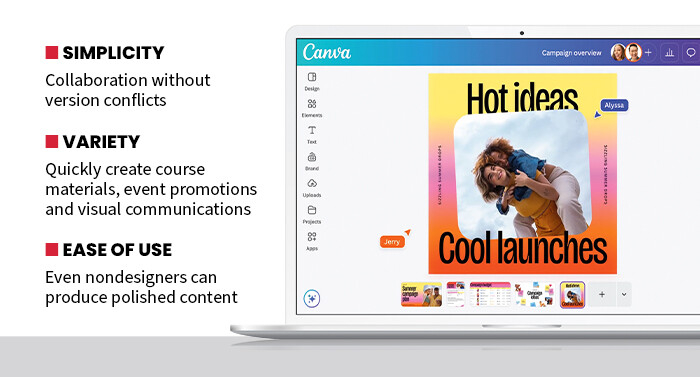







For faculty, this simplicity can help streamline course preparation. Lecture slides, visual aids and instructional graphics can be assembled quickly using templates specifically designed for educational presentations. Instructors can also collaborate with teaching assistants or colleagues in real time, allowing multiple contributors to refine course content simultaneously.
Students can also benefit from the same collaborative features. During a hands-on evaluation, several test users were able to work on group presentations at the same time, editing slides and adding visual elements without overwriting each other’s work. That type of shared editing experience makes Canva particularly well suited for project-based learning environments where teams are graded on their final product.
Canva for Campus Allows Users To Create a Range of Project Types
Another strength of the platform is its versatility. Canva supports a wide range of output formats including presentations, documents, videos, posters and even simple websites. That flexibility allows universities to use the same platform for both classroom work and institutional communications. For example, campus marketing teams can create event promotions, newsletters and recruitment materials using the same system students use for projects. This can help simplify training and reduce the number of separate tools that departments must maintain.
SPECIFICATIONS
Product Type: Visual design and collaboration platform
Deployment: Cloud-based Software as a Service
Collaboration Tools: Shared workspaces, real-time editing, commenting and version control
Content resources: Thousands of templates, stock photos, icons and design elements
Security and administration: Campuswide account management and user permissions
Performance during my testing remained responsive even when working with complex documents containing multiple images and design elements. The editing tools also felt smooth and intuitive, with collaboration features updating all changes quickly across shared workspaces.
From an administrative perspective, Canva for Campus also allows institutions to provide centralized access to design resources while maintaining oversight. Universities can deploy the platform across campus so that students, faculty and staff share a consistent set of templates and resources.
DISCOVER: Canva maximizes efficiency for all higher education users.
That approach can improve efficiency and reduce the need for multiple software licenses across departments. Instead of relying on specialized design tools that require extensive training, universities can give their communities a platform that supports both creativity and collaboration.
Ultimately, Canva for Campus helps institutions bridge the gap between professional design tools and everyday campus communication. By providing accessible design capabilities alongside real-time collaboration, the platform enables students and staff to focus on ideas and storytelling rather than software complexity.