As that shared vision emerges, there are products that can help deliver on the promise of modernization in support of seamless learning experiences across all environments.
How Modern Classroom Technology Helps Enable Learning Anywhere
Every college and university will have unique needs, but some common elements are worth looking at.
Many schools have pivoted to hybrid classes. To support those institutions’ needs, “Logitech has a full array of videoconferencing cameras that are purpose-built for education,” Ortiz says.
For example, Scribe is an AI whiteboard camera with a custom lens for videoconferencing. Reach is an adjustable content camera for sharing nondigital content. With these tools in play, “it is much easier for a professor to share content with students,” she says.
The Rally AI Camera Pro offers AI-based RightSight 2 technology, which intuitively frames every active participant or a professor giving a lecture.
“Suppose, for example, I’m giving a lecture and moving around the room. With Presenter View, advanced intelligence keeps presenters perfectly in frame, so instructors can deliver with ease while remote viewers stay connected and engaged, every step of the way,” Ortiz says.
READ MORE: AV over IP technology makes classrooms easier to manage.
All teachers need solutions that are easy to manage. “They want to avoid lost time at the start of class,” Ortiz says. That means, “you want consistency between rooms, and you want that training burden to go away.”
To that end, Logitech offers a Logitech Tap, a touch-screen controller that offers one-touch join calendar integration for quick videoconferencing, and instant content sharing that makes it easy for a professor to launch a collaborative learning experience. And there are personal workspace solutions as well, aimed at supporting teachers’ productivity.
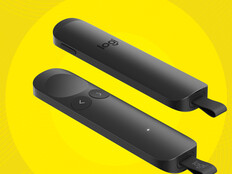
That includes the right keyboards and mice, as well as solutions like Spotlight 2, an advanced presentation remote with haptic feedback. Receive instant confirmation that you've pressed the highlight button through subtle haptic vibrations. You can zoom in on a particular area of content and can customize that view, “allowing for different highlighting effects,” Ortiz says.
Spotlight 2 even helps people who get nervous when presenting. “It times you for breathing exercises, and it vibrates to guide you: ‘Okay, breathe now,’” she says. That haptic capability helps the lecturer remain focused and makes for a better student experience.
REVIEW: The Logitech Spotlight 2 keeps presenters focused.
All these tools are delivered in a way that simplifies the work for the IT teams tasked with delivering technology in support of seamless learning. “We pride ourselves on offering solutions that are not only easy to use but also easy to support and scale,” Ortiz says.
She points to Sync, a videoconferencing device management software product that helps everyone stay connected by ensuring their Logitech video collaboration devices are healthy and up to date. “IT teams, especially those supporting a huge campus, can use our device management solutions to remotely troubleshoot or update all the units directly from their desk,” she says.
“Sync also supports a meeting room dashboard. A consolidated view of room status and device inventory gives IT valuable insight into every flex desk and video meeting room, and they can provide better support and make decisions about resources moving forward,” she says.
In today’s competitive era in higher ed, a positive learning experience matters. With the right technology supporting in-person, hybrid, HyFlex and fully remote learning, “schools can provide a much better learning experience overall,” Ortiz says. “They can deliver consistent, high-quality instruction, with a model that is repeatable across all learning spaces.”
Brought to you by: