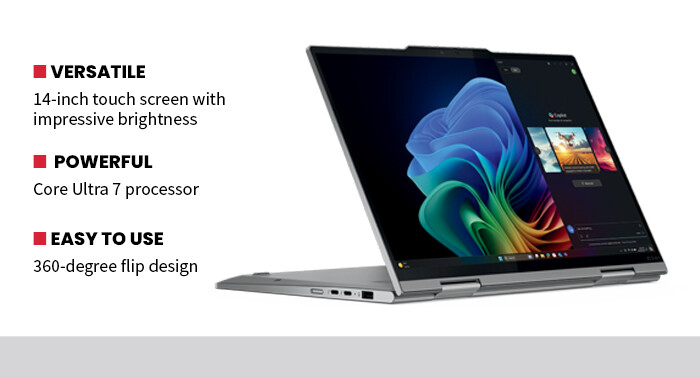
Artificial intelligence is reshaping the classroom, helping instructors work more efficiently and giving students a more personalized learning experience. Lenovo’s ThinkPad X1 2-in-1 Gen 10 Aura Edition brings that innovation directly to faculty by pairing strong processing power with a built-in suite of AI-driven tools for collaboration, security and focus.
Unlike traditional laptops that rely solely on software-based productivity, the Aura Edition integrates AI at the hardware level. Features such as Shield Mode automatically blur the screen and prompt VPN use when a user connects to a public Wi-Fi network, while Smart Mode adapts performance and power profiles to individual work habits. Together, these features enhance both privacy and productivity, which are key concerns in academic environments where faculty
Click the banner below to see how organizations are using artificial intelligence.
Lenovo Aura Edition Meets the Demands of Modern Classrooms
For instructors teaching online or in hybrid classrooms, Collaboration Mode automatically adjusts the camera, lighting and background to improve video call quality. Meanwhile, Attention Mode helps students and teachers stay on task by blocking distracting websites and notifications. These thoughtful AI inclusions make the device feel more like a classroom assistant than a traditional laptop.
Beyond AI, Lenovo delivers the kind of performance needed to handle real-world classroom demands. The Intel Core Ultra 7 processor — backed by 16 gigabytes of LPDDR5X SDRAM and 8 megabytes of cache memory — easily powers through simultaneous video streaming, multiple open browser tabs and office applications without lagging. During testing, it handled day-to-day academic tasks with ease, including running Microsoft Teams and educational simulations to processing presentation software and cloud documents.
Battery life is another strength. Lenovo claims up to 12 hours of runtime, and real-world use supports that estimate, even with heavy workloads. That reliability reduces the stress of hunting for outlets or carrying chargers. Fast charging through the USB-C port provides another practical advantage, restoring up to 80% of battery life in about an hour.
Connectivity and Design Features Makes the Device Built to Last
The X1 2-in-1 also earns high marks for its display and build quality. The 14-inch touch screen offers vibrant color and precise touch response, ideal for visual learners and digital creators alike. Using a stylus, students can annotate directly on screen, draw diagrams or engage interactively with lesson materials. The 360-degree hinge transforms the device into tablet mode, allowing it to serve as a whiteboard, e-reader or collaborative design surface.
Connectivity remains a major consideration for educators, and Lenovo covers that well. Dual Thunderbolt 4 ports, HDMI output and Wi-Fi 7 capability make it easy to connect to projectors, classroom networks and peripherals. Bluetooth 5.3 supports a wide range of wireless accessories, from headsets to external keyboards.
Physically, the ThinkPad X1 2-in-1 continues Lenovo’s tradition of rugged yet refined design. The magnesium-aluminum chassis feels premium without being heavy, and the keyboard — a consistent strength in the ThinkPad line — provides comfortable, precise typing, even during extended grading sessions or report writing. At just under 3 pounds and less than an inch thick, it’s also easy to carry between classrooms or home offices.
AI may still be an emerging trend in education, but Lenovo’s implementation shows real promise. The ThinkPad X1 2-in-1 Gen 10 Aura Edition blends intelligence, security and flexibility in a way that directly supports modern learning environments. For schools seeking a balance between cutting-edge technology and day-to-day reliability, it’s an ideal choice as a laptop that not only meets today’s classroom needs but also anticipates tomorrow’s.