Oct 01 2026
Artificial Intelligence

Google Launches New AI Tools Purpose-Built for Education

New artificial intelligence capabilities aim to use classroom materials, student insights and learning science to assist educators in providing meaningful learning activities to support their students.

Google has rolled out a wave of new artificial intelligence features across its ecosystem of products purpose-built for education. At the heart of these features sits Google Classroom, a learning hub for teachers and students globally. From bringing Classroom information directly into Gemini to bringing AI-powered scaffolding to learning journeys in Classroom, schools can now experience the best of Google’s AI for learning using Workspace for Education.

DISCOVER: Google fosters brighter futures with tools made for teaching and learning.

Securely Bringing Classroom Context Directly to Gemini

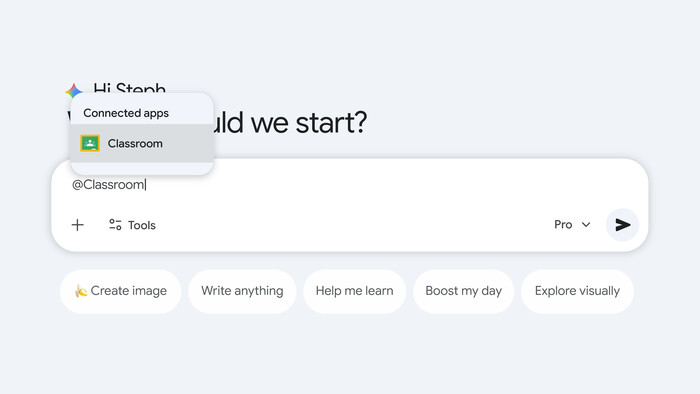
The Google Classroom connected app in Gemini offers teachers secure access to their classroom context directly within the Gemini app, accelerating AI-driven insights and driving creative actions that would have otherwise taken hours of time.

When a teacher asks questions about assignments, student performance or past grades, “the Classroom app will ground Gemini’s responses in the most relevant information for that teacher,” says Brit Mennuti, Google Classroom product lead. This makes it possible for educators to, for example, quickly get a sense of what needs to be reviewed or see which students need extra help.

Gemini Classroom
Classroom app in Gemini


Teachers have access to the Classroom app in Gemini as long as their administrator has enabled Gemini and Gemini-connected apps. And new additions to Classroom make it an even more powerful teaching companion.

A veteran educator, Tammy Lind has used Classroom extensively. Now senior strategist for Google for Education Programs at CDW, she’s excited about what it can do with support from Gemini.

“Now you can get full data from multiple classes at once. I can tell the Gemini app, ‘I want you to look at my hours one, two and three Biology and see who’s missing assignments.’ You can even go as far as to ask what type of mistakes have been made on those assignments,” she says. Previously, an educator would need to go into each class individually to digest that data. 

Another use case is in surfacing insights about students. 

“Let’s say I had given my fourth-grade math students an exit ticket to assess how well they understood yesterday’s lesson,” Mennuti says. “It could generate a new practice worksheet that focuses on the areas where they struggled the most.”

Click the banner below to find technology for today’s modern classrooms.


It’s important to note that when teachers use the Classroom app in Gemini, none of the content they create is automatically shared with students, even if the teacher asks Gemini to post it as an assignment or announcement. The app generates a draft post in Classroom that stays private until the teacher publishes it. 

In addition, the Classroom app in Gemini can help a teacher surface forgotten materials — an assignment from two years ago whose name the teacher can’t recall, for example — which can then be refined for a current class or tailored across multiple sections, with the teacher's approval.

And Gemini can differentiate among students. “I can go in and get three versions of an assignment for all different levels of students in my room,” Lind says. “I’m a special educator, so for me, that is a huge deal.”

For other potential uses, Google has published a guide for teachers and administrators, including examples of actual prompts from real teachers that have worked effectively.

Privacy is front and center here. 

“If you think about the privacy and data protections you get in Docs, in Gmail, in the Classroom product itself, those also apply to the use of the Classroom app in Gemini and to Gemini itself,” Mennuti says. “It’s enterprise-grade data protection. Student data is not human-reviewed, and it is not used to train our AI models.”

Led Guided Learning

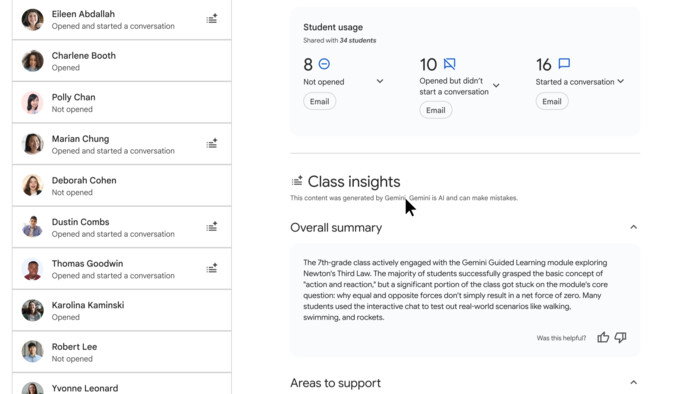
Classroom app in Gemini - class insight feature


Google Introduces New Tools for Teachers

Google also has introduced new AI tools for teachers, including a teacher-led activities framework designed to keep educators in the lead, rather than allowing AI to run independently. 

“They’re able to set some guardrails depending upon the type of assignment,” Mennuti says. “And then, on the back end, the teacher always gets insights: summaries of things like common misconceptions or areas where the class may have struggled, as well as areas of strength.” 

The teacher can click to the chat transcript and see how a given student interacted with the AI, something that students are aware of. “When students interact with these teacher-led AI experiences, there’s a prominent banner in the Gemini app or Gemini Notebook that lets them know: Your teacher can see what you’re doing here. That is so important from a privacy and transparency perspective,” Mennuti says.

When teachers view these AI experiences in Google Classroom, they can see a summary of each student’s metrics via a new insights view. A refresh of the Classroom homepage brings even more insights to the forefront. 

READ MORE: Training and support help guide districts’ Google Gemini adoption.

“As soon as you log in to Classroom as a teacher, you see top insights about your many classes and where you need to pay attention,” Mennuti says.

Another feature worth noting is study notebooks, already available in the Gemini app and coming soon to a pilot in Classroom.

“Students might be at different levels of proficiency, might have different needs in terms of learning,” Mennuti says. “Study notebooks allow us to deliver a truly personalized way to learn a topic.”

The student can tell Gemini what they want to learn, “and it helps them get there with bite-sized lessons that are tailored to their strengths and knowledge gaps,” she says. “Along the way, Gemini will test their understanding with practice quizzes, and it provides a dashboard to show progress.” Google will be testing a pilot integrating study notebooks as a new type of assignment in Classroom soon.

These tools are designed to help teachers offer truly differentiated and personalized learning at scale. In a perfect world, “a teacher in a classroom of 30 third graders could provide every student with one-on-one tutoring,” Mennuti says. “AI makes that possible today. It amplifies the teacher’s impact.”


Guided Learning

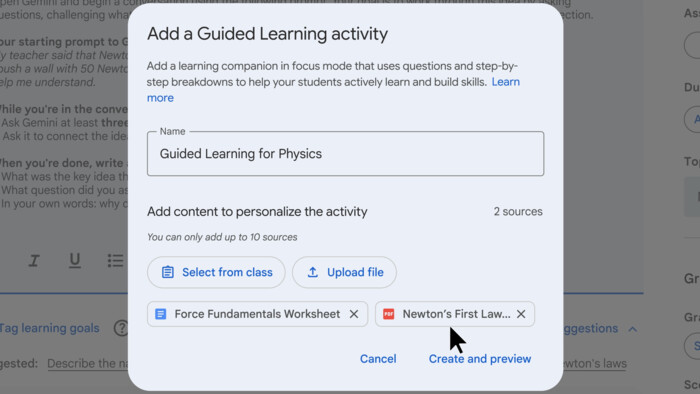
Classroom app in Gemini - Guided Learning feature


Other New Enhancements Ensure Students Are Engaged and On Task

Three other features bear mention: Class Tools, Focus Mode and Guided Learning.

Class Tools on Chromebooks offer a way for educators to control and see what students are doing and what tools they are using while they’re learning, and to leverage those for maximum learning. “If you have students that need closed captioning or translation, Class Tools can deliver that,” Lind says. “It allows teachers to push personalized content out directly to their Chromebooks.”

Focus Mode within Class Tools, meanwhile, empowers effective classroom management. “They can say, ‘Right now, you all are going to be focused on this one thing important to our lesson. You can’t go open another tab. You can’t do anything else but focus on the task at hand,’” Mennuti says.

UP NEXT: AI-ready classrooms must use the tech safely and effectively.

Guided learning mode in Gemini acts as a Socratic thought partner. Rather than doling out answers, it asks questions to guide students, “and we know that good pedagogy involves helping the student have moments of metacognition and reflection, having them actively engage in the learning,” Mennuti says. Google is bringing this mode directly into Classroom to empower teachers to assign a chat with Gemini to their students that is informed by their class materials and offer them insights into student interaction. Most important, teacher-led Guided Learning mode uses a special focus view to keep students on task so they can engage with this Socratic thought partner versus getting the answers.

All of this matters at this critical juncture in education, where providing students with technology and resources that lead to real learning progress is key That’s why Google ran a randomized, controlled trial of Guided Learning recently in Sierra Leone, where students who used Guided Learning under the guidance of their teacher saw the equivalent of 1.2 to 1.7 years of positive learning progress in eight weeks. 

“In today’s environment, where there’s so much angst about screen time, we can give teachers, administrators — and parents, quite frankly — confidence that when the student is in front of the screen using this tool, the prospects for learning are positive,” Mennuti says.

Brought to you by:

MTStock Studio/Getty Images
Close

New Research from CDW Explores AI and Cybersecurity

Learn how AI is helping IT teams manage risk and improve resilience.