Great presentations are rarely about great slides. Instead, they come from instructors who connect naturally with students, maintain eye contact and keep technology from interrupting the learning experience. While presentation remotes have existed for years, most simply replace a keyboard’s arrow keys. Logitech's Spotlight 2 aims to become something much more useful.
During my hands-on evaluation, the Spotlight 2 quickly proved itself to be more than just a slide clicker. Its thoughtful combination of wireless freedom, haptic feedback and advanced presentation tools allowed me to stay focused on the audience rather than worrying about whether a button press actually registered.
Click the banner below to learn how AV solutions can enhance the classroom experience.
Advanced Features Make the Spotlight 2 More Than a Remote
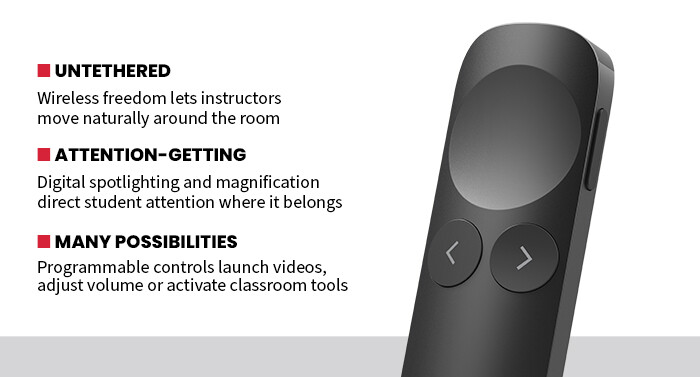
The feature that impressed me most was the haptic feedback built directly into the concave touch area near the top of the remote. Each time I advanced a slide or activated another programmed function, the remote responded with a subtle vibration. While that may seem like a small enhancement, it made a noticeable difference during presentations. We rarely found ourselves glancing down at the remote or back toward the presentation screen to confirm that commands had been received. Instead, we could keep our attention on the audience while continuing to speak naturally.
UP NEXT: ViewSonic’s WPD-900 brings effortless screen-sharing to every classroom.
The Spotlight 2 also offers several ways to direct attention beyond the traditional laser pointer. Digital spotlighting, highlighting, magnification and annotation tools create visual emphasis directly on the presentation itself rather than simply pointing at it. During my testing, I found myself using the digital spotlight effect more often than the built-in laser pointer because it naturally drew attention to key graphics and text without distracting from the overall slide.
Customization is another strength. Using Logitech's software, I programmed one of the side buttons to launch media during presentations. Other functions, such as adjusting system volume or activating different presentation tools, can also be assigned. While programming only takes a few minutes, those shortcuts eliminate repeated trips back to the keyboard and help presentations flow more smoothly.
Performance Features Keeps Presentations Up and Running
Mobility also proved valuable throughout my evaluation. Rather than remaining anchored behind a lectern or workstation, I was able to move throughout the presentation space while maintaining complete control over slides and presentation functions. The wireless connection remained stable throughout testing using both the included USB receiver and Bluetooth connectivity.
Battery performance was another pleasant surprise. I intentionally began one round of testing with a fully depleted battery and charged the Spotlight 2 for only about five minutes. That brief charging session powered the remote through more than three hours of presentations before another recharge was needed. Logitech rates a full charge at up to three months of typical use, making battery anxiety unlikely for most educators.
One unexpected feature is the guided breathing mode. Using haptic feedback, the remote quietly guides breathing exercises before a presentation begins. Experienced instructors may never need it, but student presenters or educators new to public speaking may appreciate the confidence boost before stepping in front of a class.
Physically, the Spotlight 2 feels comfortable in the hand. The slim design slips easily into a laptop bag, and the included USB receiver stores securely in the base of the remote when not in use. Setup was equally painless. Plugging in the receiver established an immediate connection with no driver installation required, and Bluetooth pairing took only a few seconds.
Ultimately, the Logitech Spotlight 2 succeeds because it removes many of the small distractions that interrupt good teaching. Rather than overwhelming educators with unnecessary complexity, it quietly enhances presentations through thoughtful features that become more valuable the longer they are used. For instructors looking to engage students instead of managing technology, the Spotlight 2 is an easy recommendation.
SPECIFICATIONS
Product Type: Wireless presentation remote
Connectivity: Bluetooth Low Energy and Logitech USB receiver
Range: Up to 100 feet
Presentation Tools: Digital spotlight, highlight, magnify, annotation and physical laser pointer
Custom Controls: Programmable buttons using Logi Tune software
Compatibility: Windows and macOS
Battery: USB-C rechargeable, rated for up to three months of use on a full charge
Additional Features: Haptic feedback, guided breathing mode, volume and cursor control